

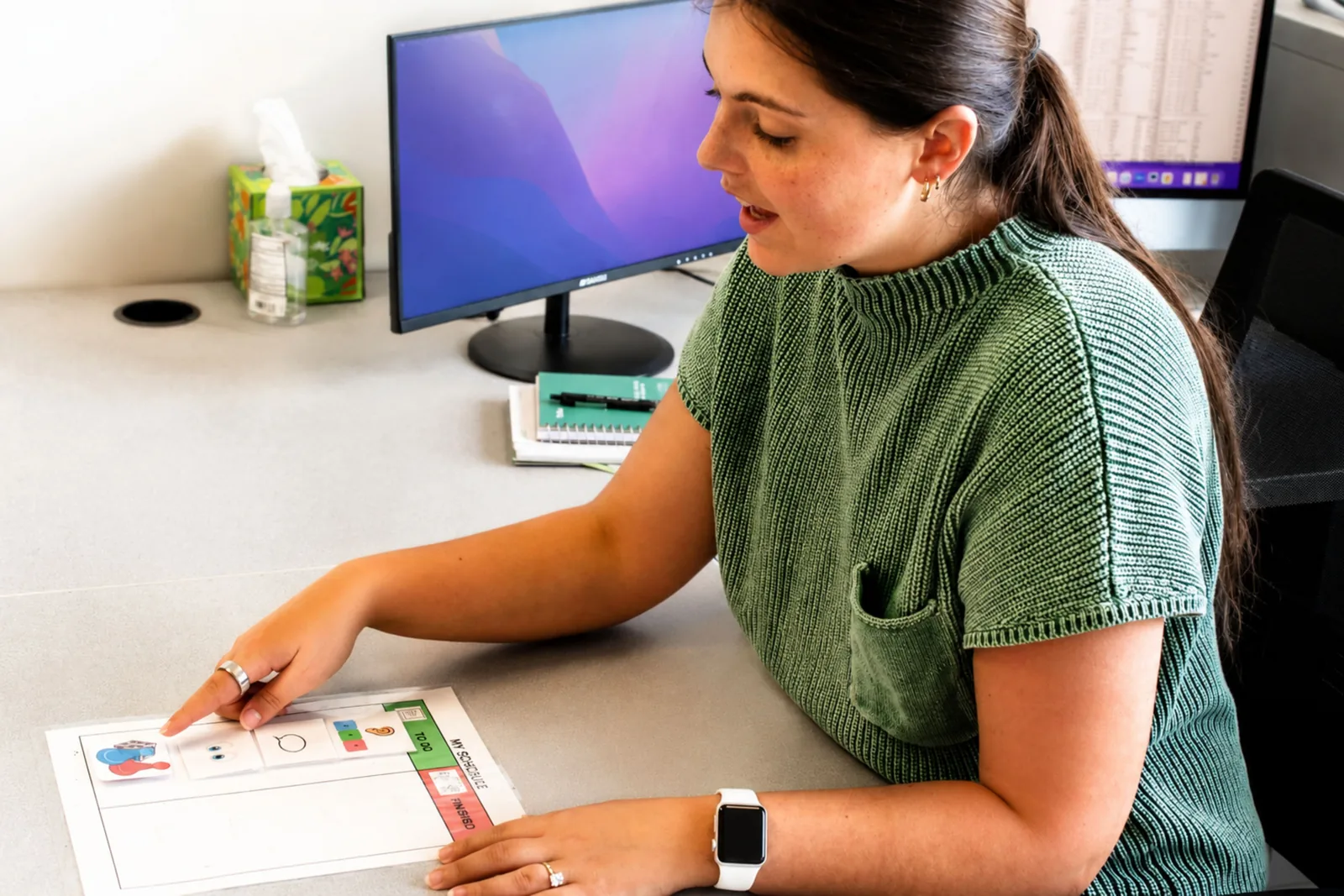
Think about how you manage your own day. A to-do list on the fridge. A calendar on your phone. A sticky note on the computer. Most adults rely on visual supports without even thinking about it — and for good reason. Seeing what's coming next reduces stress, keeps us organized, and helps us transition from one thing to the next without feeling derailed.
Children need the same thing — often even more so. For kids who struggle with transitions, anxiety around the unknown, or difficulty managing time, visual supports can be genuinely life-changing. And they don't require special equipment or a therapist to implement. Many of the most effective tools are simple, low-cost, and easy to create at home.
This guide explains the most commonly used visual supports — First/Then boards, visual timers, visual schedules, task analyses, and adapted books — and how to use each one effectively.
What Are Visual Supports and Why Do They Work?
Visual supports are tools that use pictures, words, objects, or symbols to make information concrete and predictable. They work because they reduce the cognitive load of uncertainty — when a child can see what's happening and what comes next, they don't have to hold that information in working memory or rely on processing verbal instructions in the moment.
This is especially helpful for children who:
- Struggle with transitions between activities or places
- Have difficulty understanding the abstract concept of time
- Feel anxious about new or unpredictable situations
- Need concrete reminders to complete multi-step tasks
- Benefit from knowing what to expect before it happens
Visual supports are widely used in speech-language therapy, special education, and at home — and they work across a broad range of ages and needs.
First/Then Boards
A First/Then board is the simplest and most flexible visual support there is. It shows a child exactly two things: what they need to do now (First) and what rewarding activity comes immediately after (Then).
How it works: The "First" slot contains the current task or non-preferred activity. The "Then" slot contains something the child is motivated by — a preferred activity, a snack, screen time, or any other meaningful reward.
"First put on your shoes, then we go to the park." "First finish your dinner, then you can have dessert." "First read for ten minutes, then you can play your game."
How to introduce it: Start by pairing two activities your child already enjoys — this teaches them how the board works without any resistance. Once they understand the concept, shift to using it for its real purpose: motivating them through a less preferred task.
Refer to the board before, during, and after the activity. "First, reading. Then, Legos." When reading is done: "Reading is all done! Now it's Lego time!" Celebrate the completion — the positive experience reinforces that the board is trustworthy.
Key rule: Don't give the "Then" item early. If a child learns they can get the reward without completing the task, the board loses its power entirely.
Visual Timers
Time is an abstract concept — especially for young children. Telling a child they have "five more minutes" means very little when they can't see or feel time passing. A visual timer makes time concrete.
What a visual timer does: A visual timer typically shows a colored portion that shrinks as time passes, giving children a clear, real-time picture of how much time is left. When the timer reaches zero, it beeps — providing an auditory signal that time is up and a transition is coming.
When to use one:
- During a non-preferred task to show how much time is left: "We'll work until the timer beeps, then you can have a break."
- During a preferred activity (like screen time) that has no natural ending: "You have five minutes on the tablet. When the timer beeps, we turn it off."
- As a warning before a transition: "In five minutes, we're going to start getting ready for bed."
How to introduce it: Start with small amounts of time — even two or three minutes — so the child experiences success quickly. As they grow comfortable with the timer, gradually increase the duration. Always pair it with First/Then language: "First work until the timer beeps, then short break."
Provide a verbal reminder as the time gets close: "The red is almost gone — almost time!" This prevents the beep from feeling abrupt and gives the child a moment to mentally prepare.
Visual Schedules
A visual schedule takes the First/Then concept further by showing a child their entire sequence of activities — not just two steps, but their whole morning, afternoon, or day.
What a visual schedule looks like: Visual schedules can range from simple to complex depending on the child's needs:
- A picture strip showing morning routine steps (wake up → bathroom → breakfast → get dressed → backpack → school)
- A whiteboard with the day's activities written in order
- A full daily schedule with pictures that can be moved or removed as activities are completed
Why they work: Visual schedules reduce the number of verbal reminders children need. Instead of telling a child what comes next five times, you simply point to the schedule. This builds independence, reduces resistance, and lowers anxiety by making the day predictable.
Tips for making them effective:
- Involve your child in building the schedule when possible — ownership increases compliance
- Use pictures for younger or pre-readers; words work well for older children
- Let your child physically check off or remove activities as they complete them — this gives a satisfying sense of progress
- Review the schedule together at the start of the day, and again before any major transition
- When the schedule needs to change unexpectedly, show your child on the schedule rather than just telling them — the visual makes the change concrete and less threatening
The Prompting Hierarchy: How to Build Toward Independence
When introducing any visual support — especially for transitions — it helps to think in terms of a prompting hierarchy: starting with the level of support a child needs to succeed, then gradually fading that support as their independence grows.
Here's how the hierarchy works for visual transition supports, from most to least supportive:
1. Video model — Show the child a video of themselves or someone else completing the task or transition before it happens. Excellent for children who need maximum support.
2. Task analysis — Break a single task into step-by-step pictures (e.g., handwashing: turn on water → wet hands → add soap → scrub → rinse → dry). Use when a child needs a detailed visual guide for a specific routine.
3. Full visual schedule — Shows the sequence of activities for a longer period (a morning, an afternoon, a school day).
4. First/Then board — Shows just the next two steps. A great starting point for children new to visual supports.
5. Visual timer — Provides a concrete representation of time without specifying what happens next.
6. Verbal cue — A simple spoken warning: "Five more minutes until we leave." This is the least supportive — and the goal most children are working toward.
The aim is always to fade supports over time so the child can manage transitions with increasing independence. What works for one child may not work for another — it's worth trying a few approaches to find the right fit.
Adapted Books: Making Reading Accessible and Engaging
For young children — especially those who are reluctant readers or who have difficulty processing language — adapted books can make the difference between a child who disengages from reading and one who is excited to participate.
An adapted book is a book that has been modified to make it easier for a child to access and engage with. Common adaptations include:
- Tactile elements — physical materials attached to pages that children can touch and feel (e.g., real grass glued to a page about a meadow, sandpaper for rough textures, fabric for soft ones)
- Simplified text — shorter sentences or reduced vocabulary to match the child's comprehension level
- Picture symbols — visual supports added alongside text to aid understanding
- Velcro pieces — items a child can physically move or place during the story, keeping them actively engaged
At ETLC, we create adapted books for the children we work with — and they are remarkably effective at increasing engagement, building vocabulary, and supporting language comprehension.
Try it at home: Pick a favorite book and add one or two tactile elements that connect to the story. Going on a Bear Hunt works beautifully — you can add grass, mud (play dough), a stick, and something soft for the bear's cave. The physical interaction with the book makes abstract vocabulary concrete and keeps even very young or reluctant children engaged.
Frequently Asked Questions
At what age should I start using visual supports? Visual supports are beneficial from toddlerhood onward. Even very young children (12–18 months) can benefit from simple First/Then boards using real objects rather than pictures. There is no upper age limit — many teenagers and adults use visual supports effectively as organizational tools.
My child ignores the schedule. What do I do? Start simpler. If a full-day schedule isn't working, try a three-step morning routine strip. Make sure the schedule includes activities your child cares about — not just demands. Involve them in creating it. And be consistent: schedules only work if they're used every day, not just occasionally.
Do visual supports make children dependent on them? The goal is always independence — and visual supports are a tool to get there, not a permanent crutch. As a child internalizes a routine, the visual support can be gradually faded. Many children naturally stop needing the visual once the routine is automatic.
Can I make my own visual supports at home? Absolutely. Many families use printed photos, hand-drawn pictures, or free clip art. Apps like Boardmaker, SymbolStix, and even Google Images can provide simple visuals for homemade schedules and First/Then boards. The tool doesn't need to be fancy — it needs to be meaningful to your child.
How ETLC Can Help
If your child struggles with transitions, routines, or staying on task, our team can help you identify the right visual supports and build a plan that works at home and at school.
Learn more about our Speech-Language & Social Skills services orschedule a free consultation to talk with a member of our team.
You may also find these pages helpful:
About the Author
Sonia Strueby, M.A., CCC-SLP, is the founder of Enrichment Therapy & Learning Center. With over 25 years of experience as a speech-language pathologist, Sonia has dedicated her career to helping children overcome complex communication and academic challenges. She has advanced training and a special focus on treating dyslexia and childhood apraxia of speech, and she is passionate about providing families with a clear path to success.


0 Comments